BACK
Web Content Accessibility Guideline (WCAG) 2.2
What is WCAG?
WCAG is stands for Web Content Accessibility Guideline. It's a standard used by individual, company or business to help make the website/application accessible for anyone including people with disability.
Developed by the World Wide Web Consortium (W3C), these guidelines are technology-independent and serve as the technical foundation for global regulations like the Americans with Disabilities Act (ADA) and the European Accessibility Act (EAA)
The latest WCAG is 2.2 (2026), with addition of 9 new guidelines and removal of 1 criterion. WCAG is defined by 4 core pillar and 3 levels of conformance.
The Core Pillars : POUR
Perceivable: Information and UI components must be presented in ways users can perceive (e.g., providing alt-text for images and captions for videos).
Operable: Users must be able to operate the interface and navigation, often relying on keyboard-only access or specific touch target sizes.
Understandable: The content and operation of the interface must be clear and predictable, using consistent navigation and helpful error messages.
Robust: Content must be reliably interpreted by a wide range of user agents, including assistive technologies like screen readers
Levels of Conformance
The guidelines are categorised into three testable levels of success:
Level A (Minimum): The absolute baseline; without meeting these, some users will find it impossible to access the content.
Level AA (Industry Standard): The globally accepted tier required by most laws and regulations.
Level AAA (Highest): The most stringent level, typically reserved for specialised sites or specific user populations with severe impairments.
9 Additional Criteria for 2.2 version
Guideline 2.4: Navigable
2.4.11 Focus Not Obscured (Minimum) (Level AA): Ensures that when a component receives keyboard focus, it is at least partially visible and not entirely hidden by author-created content, such as "sticky" headers, cookie banners, or chat widgets.
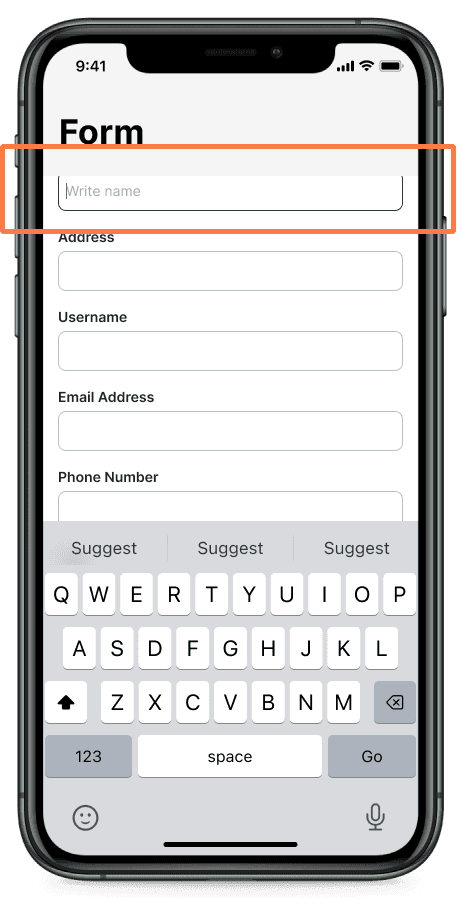
2.4.12 Focus Not Obscured (Enhanced) (Level AAA): This stricter version mandates that no part of the focused component can be hidden by author-created content.
2.4.13 Focus Appearance (Level AAA): Requires focus indicators to be of sufficient size and contrast to ensure they are clearly visible; specifically, an area at least as large as a 2 CSS pixel thick perimeter with a 3:1 contrast ratio between focused and unfocused states.
Guideline 2.5: Input Modalities
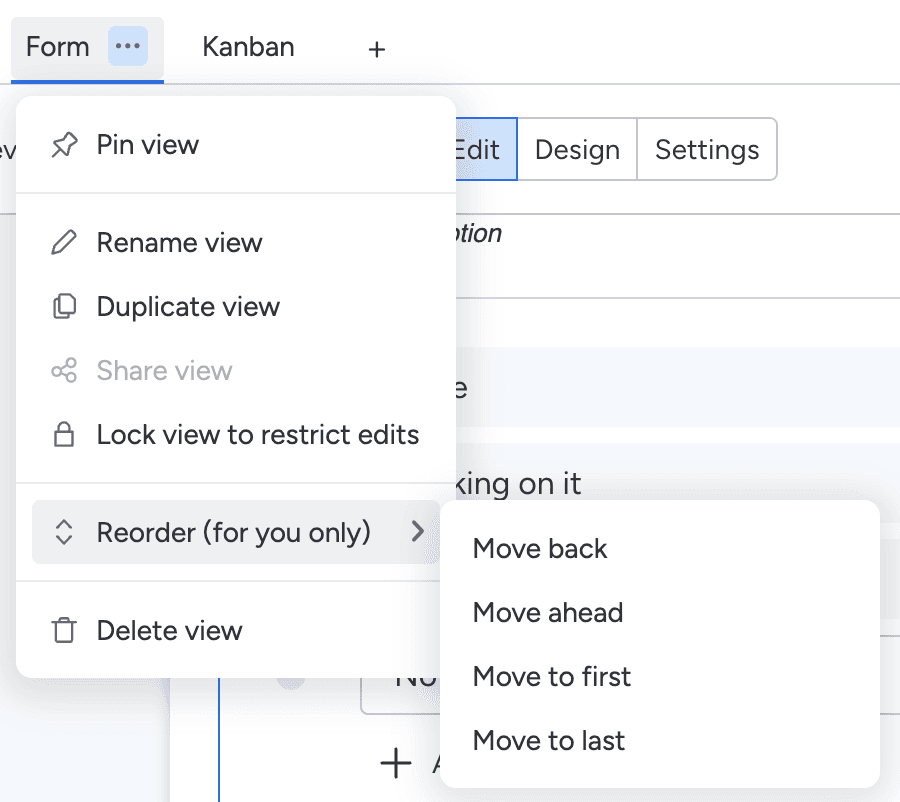
2.5.7 Dragging Movements (Level AA): Any functionality that relies on a dragging movement (like a slider or map pan) must also be achievable by a single pointer without dragging (e.g., clicking arrows or buttons), unless dragging is essential (e.g native scrolling or drawing).
Example on how Monday.com rearrange the tabs (Source: Monday.com)
2.5.8 Target Size (Minimum) (Level AA): Interactive elements must have a target area of at least 24×24 CSS pixels or provide sufficient spacing to prevent accidental activation of adjacent targets.
Guideline 3.2: Predictable
3.2.6 Consistent Help (Level A): If a website provides help mechanisms (such as chat support, contact details, or FAQs) across multiple pages, they must appear in the same relative location to make them easier to find.
Example contact details at the footer on every page (Source : IBM )

Guideline 3.3: Input Assistance
3.3.7 Redundant Entry (Level A): To reduce cognitive load, websites must not require users to re-type information already provided in the same process; this information should be auto-populated or available for selection.
3.3.8 Accessible Authentication (Minimum) (Level AA): Login processes cannot rely solely on cognitive function tests (e.g., memorizing passwords or solving puzzles like CAPTCHAs) unless an alternative method or assist is available (such as allowing password managers or copy-paste).
3.3.9 Accessible Authentication (Enhanced) (Level AAA): This stricter version prohibits requiring users to pass tests involving object recognition or identifying non-text content they previously provided during authentication
WCAG Checklist
I made a checklist from Figma Make to make it easier to review:
https://wcag-checklist.figma.site
Reference :
https://www.w3.org/WAI/fundamentals/accessibility-intro/#examples
https://www.w3.org/WAI/standards-guidelines/wcag/new-in-22/
More